
 Social Proof
How to Add Social Proof to Your Website
Learn how to add testimonials, reviews, customer counts, logos, case studies, and recent customer activity to the right pages on your website.

Adding social proof to a website is not a matter of finding an empty section and filling it with praise. The useful process is to identify what makes a visitor hesitate, collect evidence that addresses that hesitation, and place it where the decision happens.
This guide covers the major formats—testimonials, reviews, customer counts, logos, case studies, recent purchases, subscriptions, and third-party reviews—and shows how to turn them into a coherent system.
Step 1: Find the trust gap on each page
Start with the page’s job and the question a visitor is likely asking.
- A homepage visitor may ask, “Is this a real, active business?”
- A feature-page visitor may ask, “Will this solve my specific problem?”
- A pricing-page visitor may ask, “Is the product worth the cost and risk?”
- A Chrome extension visitor may ask, “What do users say outside this website?”
- A checkout visitor may ask, “What happens after I pay?”
Write down the top one or two objections for each high-intent page. Social proof belongs only where it can answer one of them. If you cannot name the doubt a proof block resolves, it is probably decoration.
Step 2: Choose the strongest available evidence
Use the most direct evidence you can support, not the format that happens to be fashionable.
Testimonials
Use testimonials when a customer can describe a recognizable problem and outcome. Ask for the customer’s role, company, use case, and permission to publish the final quote. Edit for length only with approval; never sharpen the result beyond what the customer said.
Place a short quote beside the feature or objection it addresses. A longer customer story can sit lower on the page or link to a full case study.
Customer reviews
Use reviews when your customers already leave feedback on a marketplace, app store, review platform, or product page. Keep the rating, date, reviewer context, and original source close to the excerpt.
Research from Northwestern University’s Medill Spiegel Research Center found that purchase likelihood for a product with five reviews was 270% higher than for a product with none in its retail dataset. Treat that as evidence that even a small review base can matter—not as a guaranteed SaaS conversion lift. Read the original study and its limitations.
For Chrome extension developers, PopupNeko can import eligible four- and five-star text reviews from a connected Chrome Web Store listing. You choose which reviews appear, and excerpts must remain faithful to the original. See how to show Chrome Web Store reviews on your website.
Customer or user counts
Use counts when the number is meaningful and well-defined. “1,800 paying teams” is clearer than “Thousands trust us.” “50,000 installs” is not the same as 50,000 active users, so label the metric accurately.
Round down to a threshold you can maintain, record how the number is calculated, and set a reminder to update it. If the count is still small, a specific testimonial or recent activity may tell a stronger story.
Customer logos
Use logos to show audience fit, especially for B2B products. Obtain permission and describe the relationship accurately. A logo from a free signup, beta participant, agency client, and paying SaaS customer does not mean the same thing.
Choose a representative set instead of the biggest names alone. A founder comparing tools may care more about seeing another bootstrapped SaaS than a global brand with an unknown use case.
Case studies
Use case studies for expensive, complex, or high-risk decisions. A credible case study should explain:
- The customer’s starting point.
- Why the old process was insufficient.
- What they implemented.
- How long the change took.
- The measured result and method.
- Constraints or caveats that help readers judge fit.
Pull one accurate result onto the relevant landing page, then link to the full story. This gives scanners a useful signal without hiding context from serious buyers.
Recent purchases and subscriptions
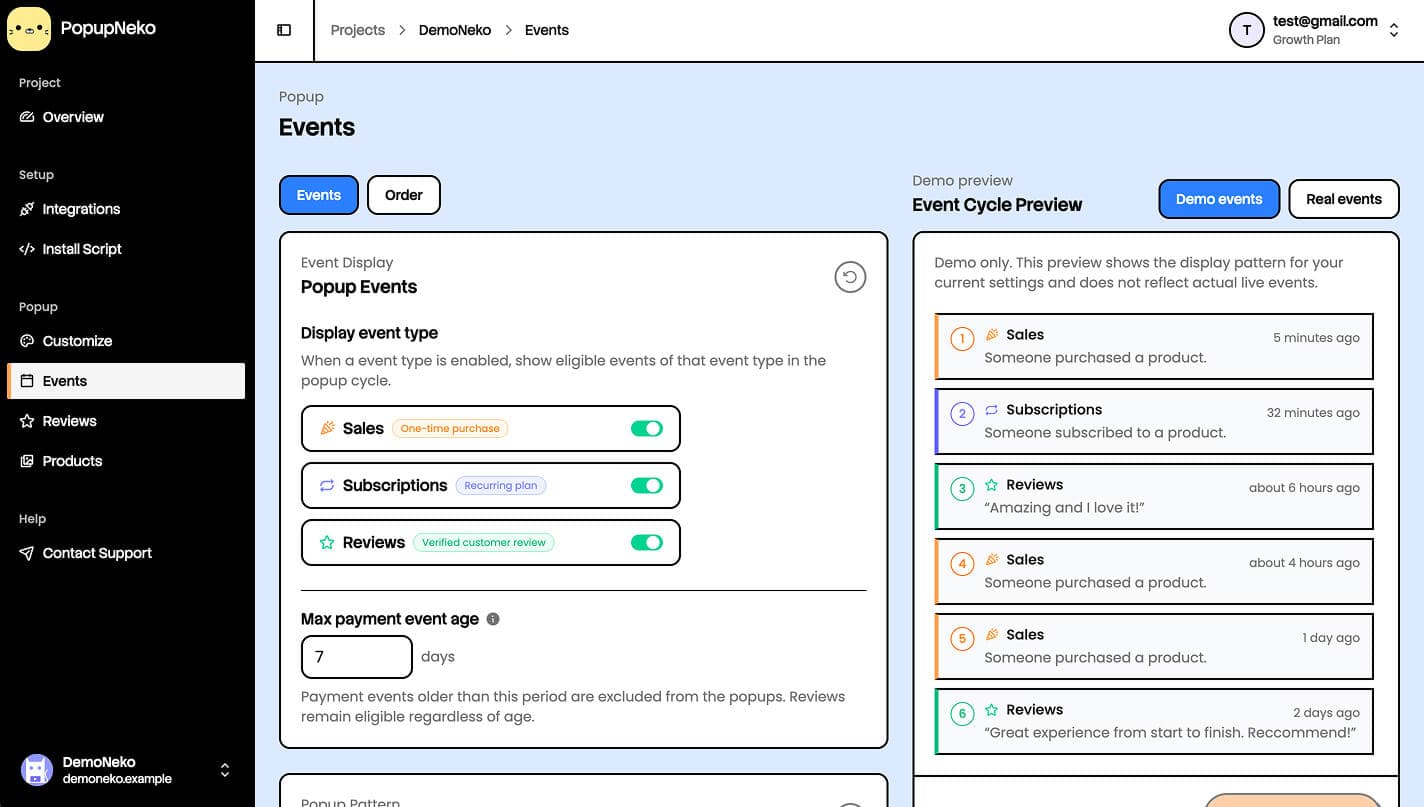
Use recent customer activity when visitors need evidence that people are buying or joining now. Keep the message factual: the product or plan, event type, approximate time, and optionally an approximate location when the source provides one.
Do not display names, emails, exact addresses, or payment details. Avoid showing a renewal as though a new customer just subscribed. A restrained notification such as “Someone started the Studio plan 3 hours ago” is clearer than breathless urgency copy.
PopupNeko can automatically display eligible purchases and new subscriptions from Stripe, Lemon Squeezy, or Polar. Each project connects one payment provider, and renewals are excluded from new-subscription events. The integration documentation describes the supported activity in detail.
Third-party reviews and activity
Use third-party evidence when the source itself adds credibility. Keep attribution visible and offer a path to the original review or verification context when possible.
Do not paste a platform logo beside manually written text in a way that implies the platform verified it. The content, source, and relationship must match. This is where an automated connection can reduce both maintenance and temptation to overstate the evidence.
Step 3: Put social proof near the decision it supports
Social proof is strongest when the visitor sees it at the moment of uncertainty.
Homepage
Use one broad signal near the main value proposition: a defensible customer count, a short logo row, or one strong testimonial. Recent activity can reinforce that the product is active, but it should not compete with the primary CTA.
Feature and use-case pages
Match the evidence to the feature. Place a quote about faster reporting beside reporting, a review about easy installation beside setup, and a case-study result beside the workflow that produced it.
Pricing page
Use proof to answer risk and fit: who chooses each plan, what result they achieved, and whether people are subscribing now. Avoid stacking a sticky chat button, cookie banner, discount timer, and notification over the same mobile viewport.
Signup and checkout
Keep proof compact. A short privacy reassurance, refund or trial terms, and a single relevant customer quote can help. Do not introduce moving notifications that distract from form completion.
If you use PopupNeko, page targeting lets you include high-intent paths and exclude account, support, checkout, or other pages where a popup would add noise.
Step 4: Make every claim auditable
Create a simple proof register in a spreadsheet or internal document. For each item, record:
- The exact public claim.
- Its source and source URL.
- Customer permission, where needed.
- The metric definition and date range.
- The owner responsible for refreshing it.
- An expiry or review date.
This prevents an old role, outdated customer count, expired logo permission, or unrepeatable result from remaining on the website indefinitely.
For reviews and testimonials, preserve the customer’s meaning and disclose relevant incentives or relationships. Never create a fictional review or sale. PopupNeko is deliberately source-constrained: merchants cannot type a free-form sale or testimonial into the product and present it as verified activity.
Step 5: Design for clarity, not pressure
Use the same typography, spacing, and tone as the rest of the page. A social proof block should feel native without disguising what it is.
For static proof, make names, roles, dates, sources, and links legible. For rotating notifications, start after the visitor has had time to orient, leave a comfortable gap between events, limit the number shown, and pause or hide them when they would cover an important control.
PopupNeko’s customization controls cover appearance, timing, display limits, mobile visibility, product links, source links, and popup position. Preview long product names, missing locations, and narrow screens—not just the cleanest sample event.
Step 6: Launch a small proof system
You do not need every format on day one. A practical first release might be:
- One specific testimonial beside the primary feature.
- Three sourced reviews on the pricing page.
- One accurate user or customer count near the main CTA.
- Recent verified customer activity on the homepage and pricing page only.
- One detailed case study linked from the most relevant use-case page.
Install the content, test every link, check mobile overlap, and view the page while signed out. If PopupNeko is part of the mix, follow the getting-started guide to connect a source, configure events, install the script, and verify the production site.
Step 7: Measure whether the proof helps
Track the action the page exists to produce: pricing views, trial starts, demo requests, checkout starts, or paid conversions. Also track interactions with case studies, original-review links, product links, and other proof elements.
Compare a meaningful period before and after the change, but remember that seasonality, traffic source, pricing changes, and campaigns can affect the result. For higher-traffic pages, run a controlled test with one substantial proof change at a time.
PopupNeko records popup impressions and clicks and can help you distinguish exposure from interaction; the analytics guide explains the available metrics. Your own analytics should remain the source of truth for the final website conversion.
A final quality check
Before publishing, ask:
- Does this proof answer a real visitor question?
- Is the claim specific enough to be useful?
- Can we verify the source today?
- Do we have permission to show the identity, quote, logo, or result?
- Is sensitive customer information excluded?
- Does the proof stay out of the visitor’s way on mobile?
- Will someone own and refresh it?
If the answers are yes, the proof is ready to earn its place on the page. For more format ideas, browse seven social proof examples for SaaS websites. If you want to automate supported payment and review activity, start a PopupNeko free trial.
