
Manage your reviews
Import verified Chrome Web Store reviews, choose excerpts, and save your popup selection.
On this page
Connect your Chrome Web Store source before opening Reviews. Reviews must come from the connected source and pass verification; you cannot enter a free-form customer testimonial.
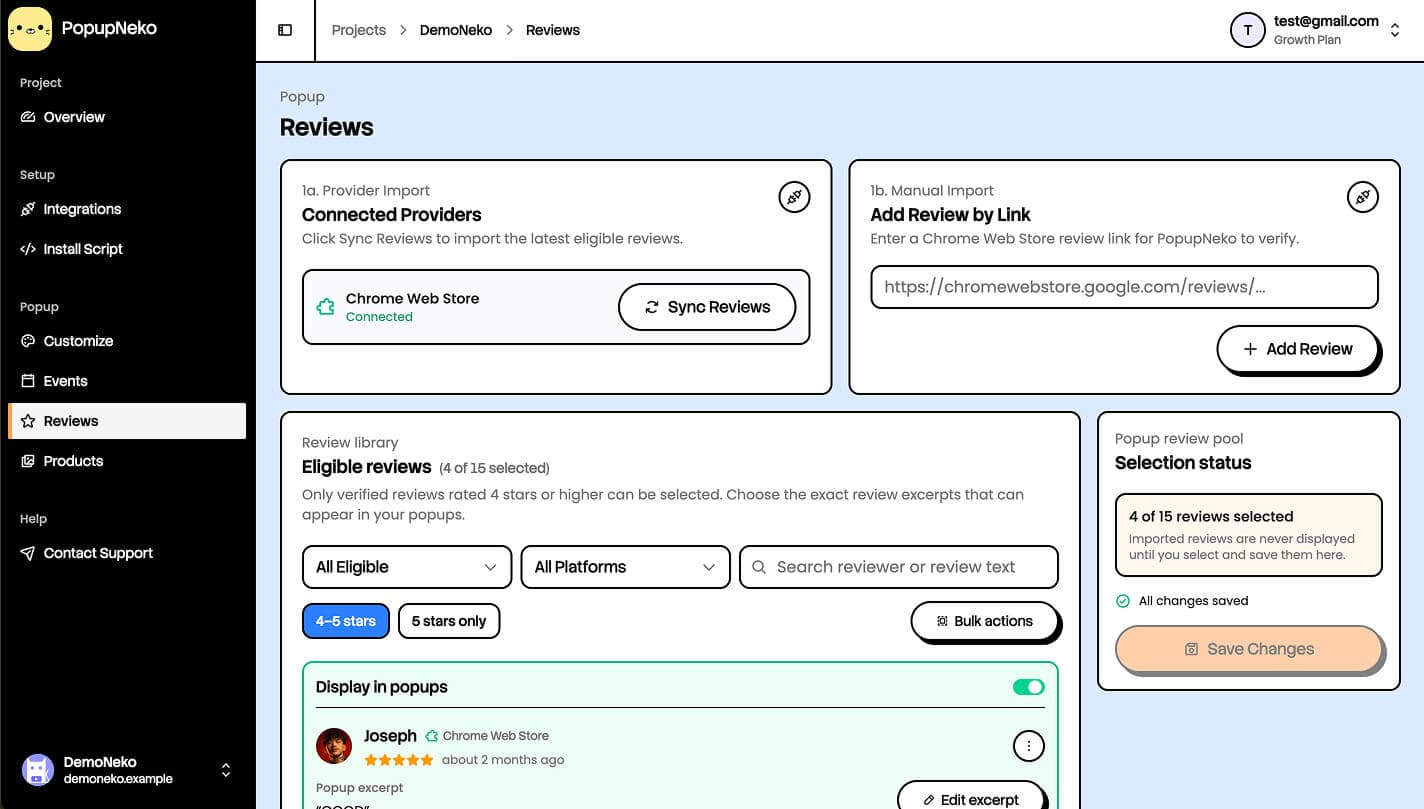
Import and sync
Use the provider sync action to fetch up to 15 newest eligible four- and five-star text reviews. Alternatively, submit a public link to a particular review for verification. A newly imported review is a library candidate, not automatically a selected popup.
Sync happens when you request it. Later syncs preserve manually imported, selected, and excluded reviews. Older unselected records owned by the sync may be pruned to keep the library's synced set bounded.
A successfully added link opens and highlights the imported review so you can find it even when the library is filtered or paginated.
Select reviews for popups
- Find the review in the library.
- Turn on its the Display in popups switch.
- Select an excerpt from its original review if needed.
- Repeat for the other reviews you want, then save your selection.
You can select up to 15 reviews. New or edited excerpts must be a contiguous passage from the original text, no longer than 130 characters. Existing unchanged legacy excerpts can retain their older allowance until edited. Do not rewrite wording, combine separate passages, or add claims to an excerpt.
The ellipsis option adds an ellipsis when rendered without changing the verified passage. The original rating and reviewer information remain associated with the review.
Enable Reviews on the Events page too. Selection alone does not override a disabled event type.
Find reviews and use bulk actions
Use the status, platform, rating, and search controls to find reviews. Eligible (All) lists selected reviews first, followed by other eligible reviews. Other status views include Selected for Popups, Not Selected for Popups, and Excluded.
Bulk-action mode uses temporary checkboxes, separate from the popup-display switches. Select a bulk action and the relevant reviews, then apply it. Available actions depend on the review state and include display, hide, exclusion, restoration, and removal.
Exclude or remove a review
Exclude a review when you want to keep it out of provider syncing and popup selection without losing its verified record. Excluded reviews remain excluded until you restore them or deliberately re-add them by link.
Removal deletes a library record; it is not the same as a persistent sync exclusion. Use exclusion when you do not want a review to reappear during a later sync. Follow the UI confirmation for destructive actions.
Import allowances
Before paid access, each project has separate allowances for provider sync and individual-link verification:
- Before a trial: 3 sync attempts and 3 link-verification attempts.
- Starter trial: 10 sync attempts and 15 link-verification attempts.
- Paid access: no visible product import quota. Former subscribers with locked access must restore billing to import again.
Invalid input or a disconnected source is rejected before consuming an attempt. Once an external request starts, the attempt counts even if the source returns no eligible reviews, the request fails, or verification cannot be completed. These are tier-specific allowances, not daily reset promises.
If you run out, existing imported reviews, selection, configuration, and preview remain available. The dashboard offers the appropriate upgrade or trial-conversion action. See Billing.
Review appearance and links
Choose reviewer images, accent colors, and original-review link behavior in Customize. When source links are enabled and available, the reviewer image and rating/name attribution open the original review. The excerpt stays non-interactive.
Review events are not filtered by the 1–7 day payment-age setting. To change their mix with purchases, use event ordering.